Git Cheat Sheet – cheat sheets

Git Cheat Sheet

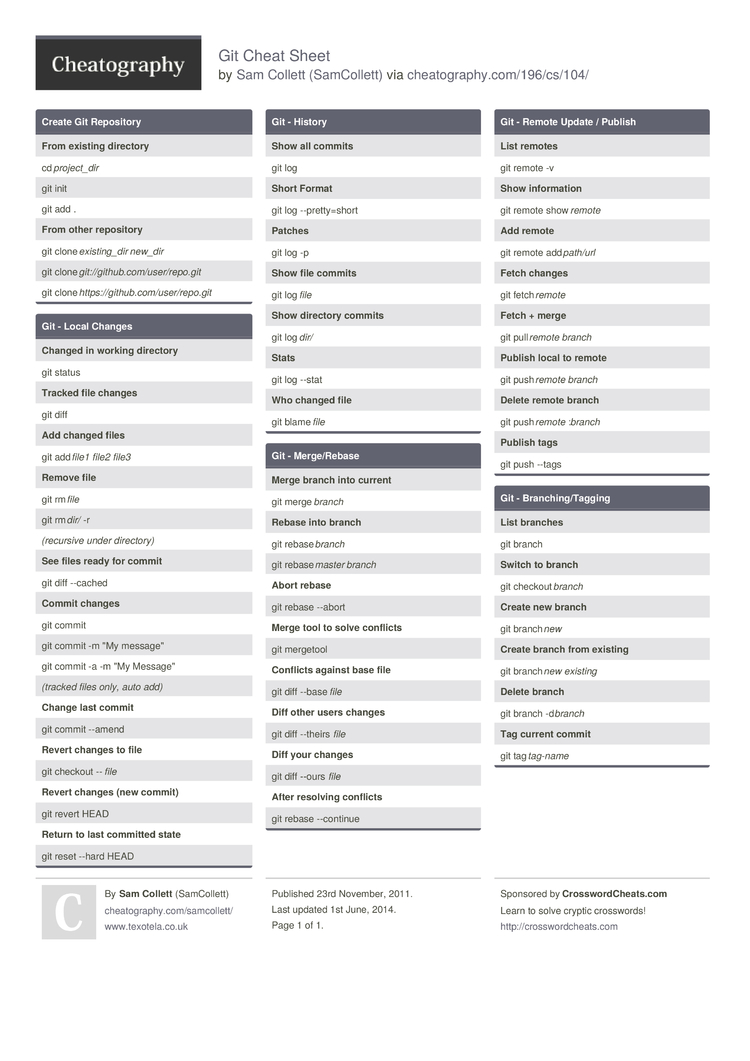
Cheat Sheet for the Git Distributed Version Control System. Based on https://github.com/AlexZeitler/gitcheatsheet and http://www.git-tower.com/files/cheatsheet/Git_Cheat_Sheet_grey.pdf

Create Git Repository

From existing direct­ory
cd proje­ct_dir
git init
git add .
From other reposi­tory
git clone exist­ing­_dir new_dir
git clone git:/­/gi­thu­b.c­om/­use­r/r­epo.git
git clone https­://­git­hub.co­m/u­ser­/re­po.git

Git – Local Changes

Changed in working direct­ory
git status
Tracked file changes
git diff
Add changed files
git add file1 file2 file3
Remove file
git rm file
git rm dir/ -r
(recu­rsive under direct­ory)
See files ready for commit
git diff –cached
Commit changes
git commit
git commit -m «My messag­e»
git commit -a -m «My Messag­e»
(tracked files only, auto add)
Change last commit
git commit –amend
Revert changes to file
git checkout — file
Revert changes (new commit)
git revert HEAD
Return to last committed state
git reset –hard HEAD

Git – History

Show all commits
git log
Short Format
git log –pret­ty=­short
Patc­hes
git log -p
Show file commits
git log file
Show directory commits
git log dir/
Stats
git log –stat
Who changed file
git blame file

Git – Merge/­Rebase

Merge branch into current
git merge branch
Rebase into branch
git rebase branch
git rebase master branch
Abort rebase
git rebase –abort
Merge tool to solve confli­cts
git mergetool
Conf­licts against base file
git diff –base file
Diff other users changes
git diff –theirs file
Diff your changes
git diff –ours file
After resolving confli­cts
git rebase –continue

Git – Remote Update / Publish

List remotes
git remote -v
Show inform­ation
git remote show remote
Add remote
git remote add path/url
Fetch changes
git fetch remote
Fetch + merge
git pull remote branch
Publish local to remote
git push remote branch
Delete remote branch
git push remote :branch
Publish tags
git push –tags

Git – Branch­ing­/Ta­gging

List branches
git branch
Switch to branch
git checkout branch
Create new branch
git branch new
Create branch from existing
git branch new existing
Delete branch
git branch -d branch
Tag current commit
git tag tag-name

Download the Git Cheat Sheet

PDF (recommended)

Alternative Downloads

Share This Cheat Sheet!